signtools4.com

Buy CorelDRAW & Get
SignTools 4 FREE

$799 AUD
including International Shipping
For more information click here.


Allen Datagraph 936V Vinyl Cutter Setup instructions
SignTools Settings
After installing CorelDRAW the next step is to install SignTools. Follow the instructions on 4 and 5 of the SignTools 4 User Guide.
Once you have installed SignTools, open Corel Draw and click on the
Application Launcher (see picture below) and choose SignTools
4.
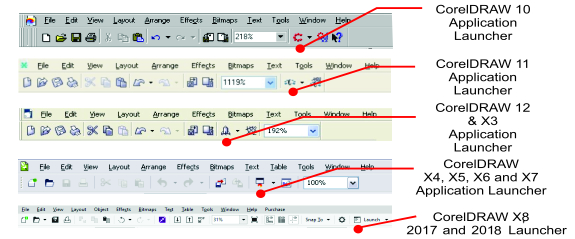
Next click on the "Cut" button and then the "Setup" button. Select the Allen Datagraph 936V from the "Device" drop down box and select your port.
If you are using a Serial (Com) port click on the “Properties”
button and set the following settings:-
Bits per second : 9600
Data bits: 8
Parity: None
Stop bits: 1
Flow Control: Hardware
CorelDraw Settings
In CorelDraw's Layout menu select Page Setup. A dialog
box will appear. Set Width to 3200mm (126 inches) and Height to
585mm (23.03 inches).
Ensure that you are using a Landscape page.

To set this as a default page in CorelDRAW click on the Tools menu and choose Options. Click on the word Document on the left hand side and ensure all of the options are ticked and click on the OK button.
To cut any object in CorelDraw, simply place on the page in the bottom left corner. If you wish to cut in a portrait fashion simply rotate your graphics.
Additional note
SignTools 4 cuts from the bottom left of the page either manually place object(s) in the bottom left of the CorelDRAW page or use the "Vinyl Saver" tool with the sliding bar all the way to the left.